Risk modelling is a key tool in the battle against cybercrime and attackers. ProTego’s process for static risk modelling is described in [1] and follows a standardised risk assessment approach described in ISO 27005 [2], where the operational system’s assets and relationships between them are identified, and a system risk model is constructed based on them. Threats are automatically identified, and from these threats, risks are determined.
The risk modelling process is supported by a decision support toolkit named the “System Security Modeller” (SSM) toolkit, that has been developed at University of Southampton over 7+ years. The SSM has the following concepts.
- Asset: something that has value within the system
- it contributes to the purpose of the system, there is a cost if that contribution is lost
- Assets have different types, e.g. ICT hardware, networking, software processes, data, people, physical spaces
- Relation: connectors between Assets in models of operational systems
- Misbehaviour: an adverse effect in Asset behaviour or status caused by a Threat attacking the Asset
- Risk is determined for each Misbehaviour
- Threat: a situation or event that could cause Misbehaviour
- Threat effects: the Misbehaviours caused by a Threat
- Secondary Threat: a Threat representing a mechanism for the propagation of effects
- Risk: the severity of a Misbehaviour
- Based on the likelihood of its occurrence (calculated by the SSM and determined by the likelihood of Threats causing the Misbehaviour) combined with the impact it would have (set by the user based on their use case, the asset’s value etc)
- Overall Risk level is highest of all Misbehaviour Risks in the model
- Risk levels are measured using a Likert scale of: Very High, High, Medium, Low, Very Low.
- Matching Pattern: Specification of Assets and Relations between them that triggers Threats
- Trustworthiness: propensity of an Asset to avoid/resist Threats.
- An Asset’s Trustworthiness affects the likelihood of successful attack of that Asset by Threats – the higher the Trustworthiness on an Asset, the lower the likelihood of relevant Threats on that Asset.
- Asset types have multiple measures of Trustworthiness, known as “Trustworthiness Attributes” (TWAs). These represent resistance capabilities to different types of threat.
- Control: a security measure protecting an Asset that helps it resist Threats
- Control Strategy: a combination of Controls that address one or more Threats
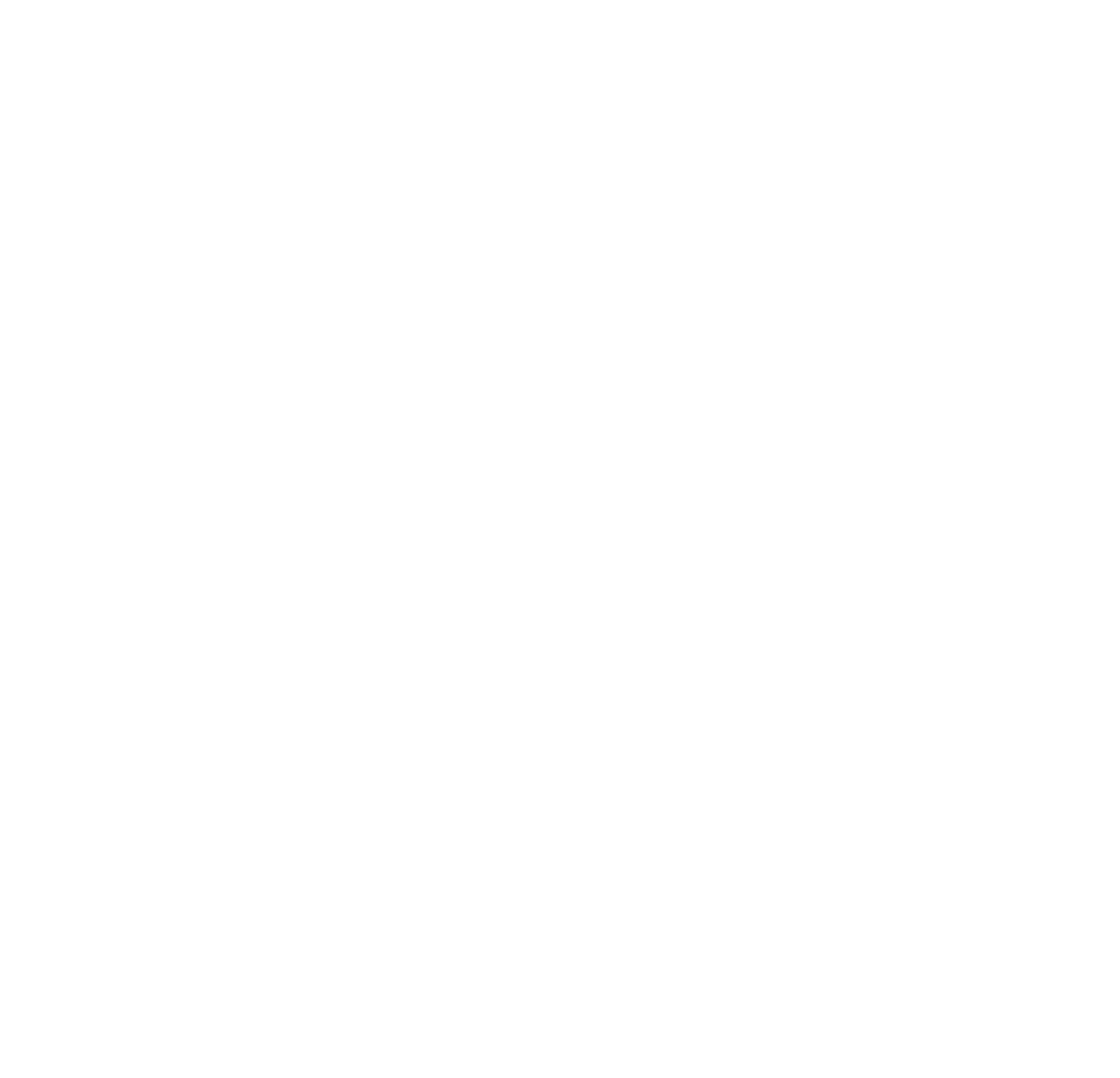
An overview of the SSM toolkit in use is shown in the figure below. Expert risk management and threat knowledge is captured in a “Domain Model” that is bundled with the SSM toolkit. The Domain Model contains patterns of assets of different types (e.g. ICT components, processes, data, stakeholders and physical spaces) and relationships, threats that pertain to these patterns, misbehaviours (adverse effects) that occur on the assets if the threats are able to affect the assets, and controls that can block the threats and thus mitigate the risks. Users of the toolkit build “System Models” that describe their socio-technical system in terms of assets and relationships, using the same asset types as encoded in the Domain Model. The SSM matches asset patterns between domain and system models, and from this identifies applicable threats, which determine adverse effects on assets and from this it can determine risks to assets in the system. The SSM can also suggest controls to mitigate threats; which, if applied, will lower risk levels.
A screenshot of the toolkit’s User Interface is shown below.
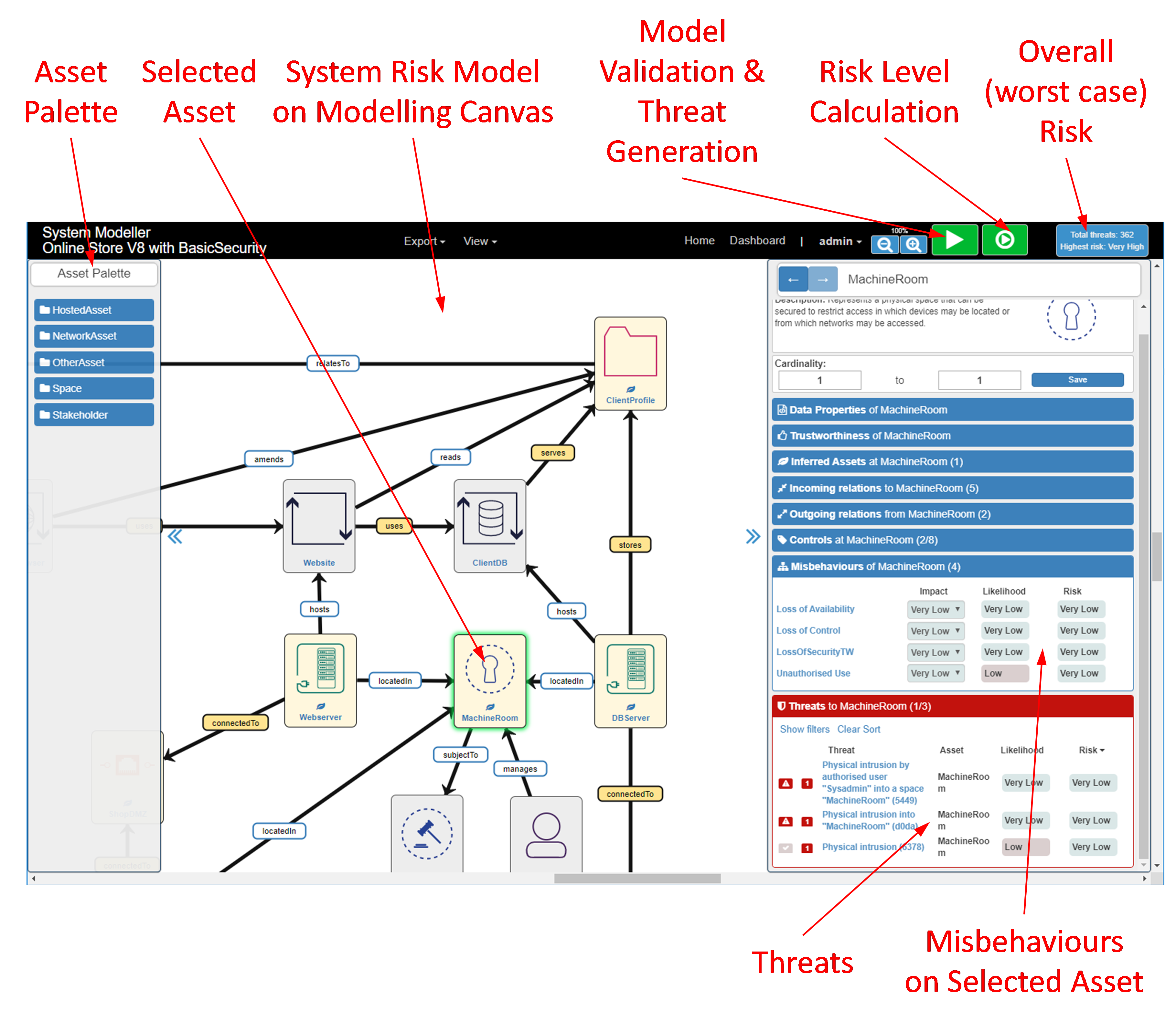
The overall process for using the SSM for design-time risk modelling is as follows.
- Identify system assets and relationships and build a risk model by dragging and dropping assets in the modelling canvas and connecting them up.
- Press the “Model Validation” button (green button with an arrow top right) to check the risk model and autogenerate hidden (inferred) assets, asset properties, and threats.
- Specify input impact levels for different misbehaviours on assets in the misbehaviours panel at the centre right of the UI.
- Add security measures (controls) already specified or implemented.
- Run risk calculation to determine risk levels (green button with a circle, top right).
- If the risk levels are not acceptable, add more security measures using recommendations provided by SSM and go to step (5), or go to back to step (1) and change the design (i.e. assets and relationships).
The threats that cause the misbehaviours can be explored and control strategies are recommended to block the threats. These controls can be applied to assets within the system and the risk calculation rerun to determine the remaining misbehaviours and the threats that cause them, in an iterative way until the overall risk level is brought down to an acceptable level. The application of a control to an asset can contribute to addressing multiple threats, and in turn can prevent threat propagation. Hence, the number of high or very high-level threats can be reduced by the application of a moderate number of controls.
This blog post was written for the ProTego project by Steve Taylor (IT Innovation).
References
[1] Mohammadi, N., Goeke, L., Heisel, M. and Surridge, M. Systematic Risk Assessment of Cloud Computing Systems using a Combined Model-based Approach.In Proceedings of the 22nd International Conference on Enterprise Information Systems (ICEIS 2020) – Volume 2, pages 53-66 DOI: http://doi.org/10.5220/0009342700530066. 2020.
[2] Information technology — Security techniques — Information security risk management. ISO/IEC 27005:2018. Available at https://www.iso.org/standard/75281.html, retrieved 2021-06-04.